Duration
About 2-3 hours
You set every stage timing from the professor panel, so it fits one block or splits across two sessions.

Cybersecurity Simulation
The Finsimco Cybersecurity Simulation gives each student $2 million and five things that could go wrong, from a stolen laptop to ransomware. They work out how likely each one is and what it would cost, then buy the fixes in the order that removes the most risk.
Duration
You set every stage timing from the professor panel, so it fits one block or splits across two sessions.
Format
Each student works alone and asynchronously, taking the threats, money and plan roles in turn.
Level
Adjustable to the level you teach. The same activity suits a first-year class or an MBA group.
Professor tools
Manage students, adjust stage timings, control progression and monitor individual inputs.
Prerequisites
No technical background is assumed. Every risk in the activity is explained as it comes up.
Delivery
The web-based simulation supports in-person, remote, blended and homework-supported delivery.
Assessment
Every submission is individual, so each student's decisions and reasons export for grading, or run it ungraded.
Course fit
Designed for Cybersecurity, Risk Management, Information Systems, Operations and Audit courses.
The topics a cybersecurity module has to cover: the things that can actually go wrong in a business, how often each one happens, what it costs when it does, the expected loss that comes from multiplying the two, how much of that loss a control actually removes rather than reduces, and what a company does on the day something gets through anyway.
Written to drop into your module descriptor without rewriting. On completing the simulation, your students will be able to:
Each student spends the budget alone, holding the threats, money and plan roles in turn. All three want something different from the same $2 million, and only one plan gets submitted.
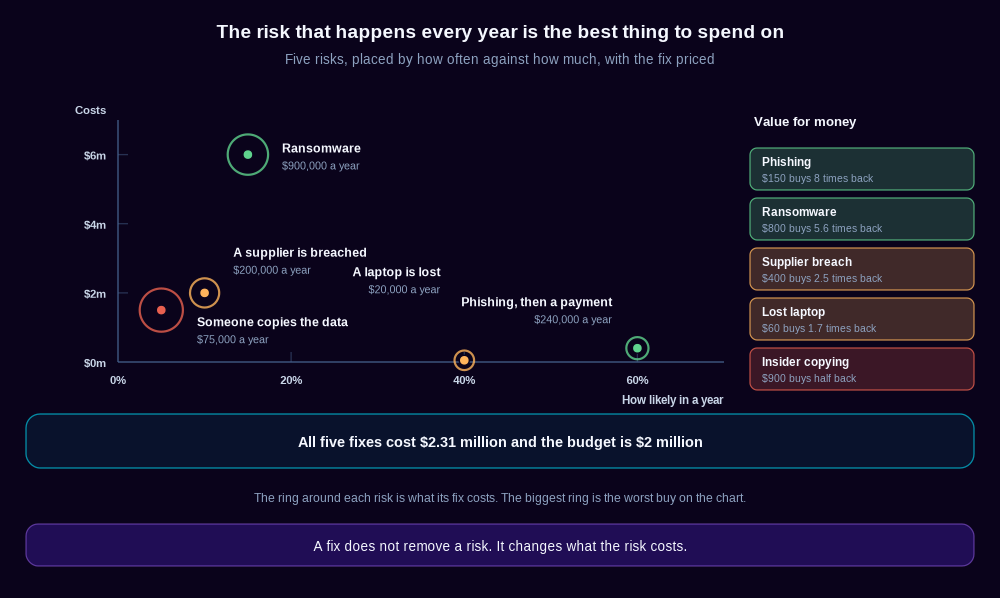
Students work out how often each of the five things happens and what it costs when it does, which turns five worries into five numbers.
Students hold $2 million and find that it buys four of the five fixes, so the question is which four and in what order they are bought.
Students decide what happens on the day something gets through anyway, because no amount of money takes any of the five chances down to zero.
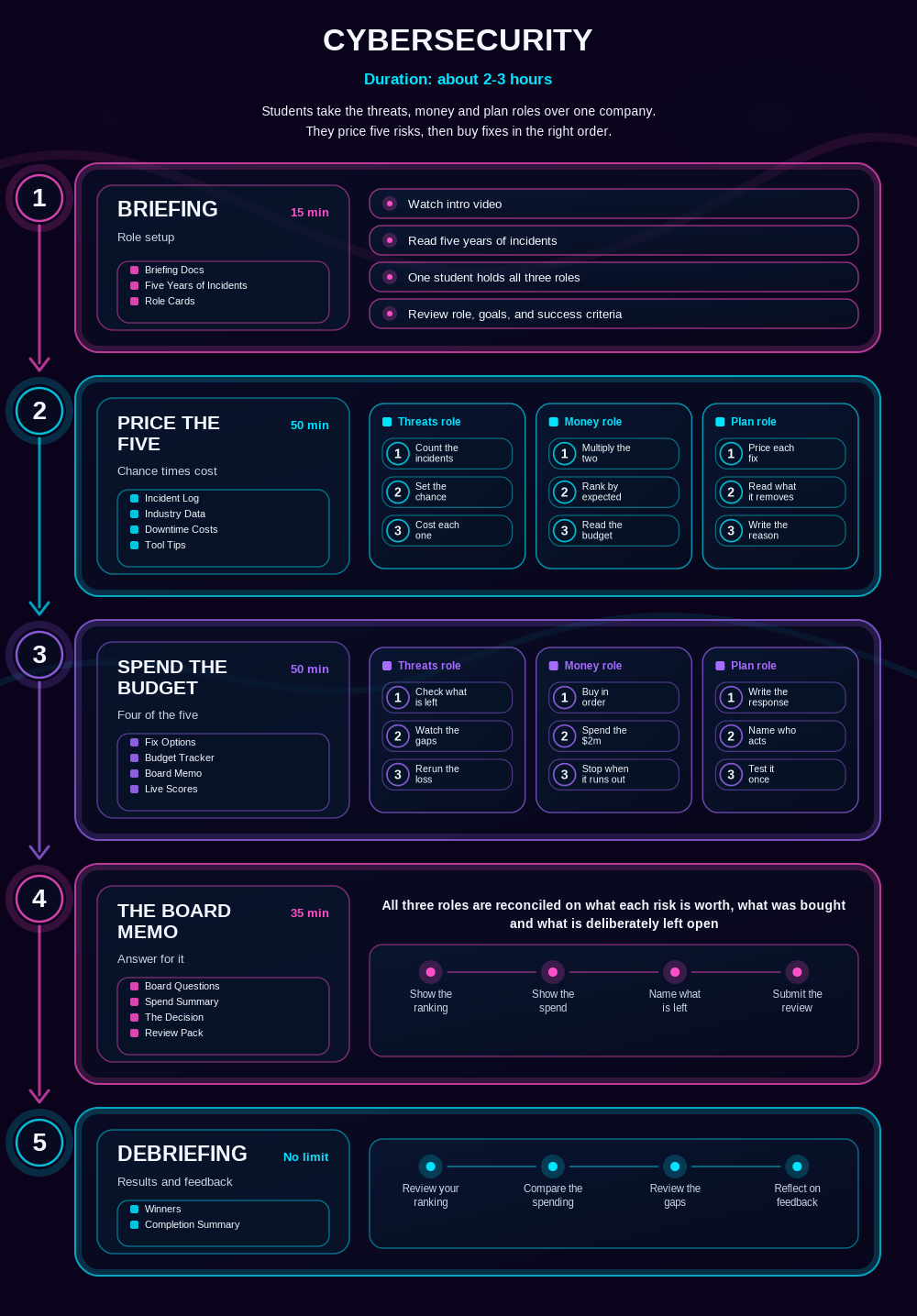
Five stages. Students price five risks, then spend $2 million in the right order.
Stage 1 · 15 min
briefing docs · five years of incidents · role cards
Students watch the intro video, read five years of security incidents at a 600-person company, and take on all three roles, checking what each one is judged on before any risk is priced.
Stage 2 · 50 min
incident log · industry data · downtime costs · tool tips
The risks get priced. Working as the threats, the student finds phishing happens most years and ransomware about one year in seven; as the money, multiplies chance by cost into an expected loss for each; as the plan, prices the fix for each one. One ranking is submitted with a reason for every line.
Stage 3 · 50 min
fix options · budget tracker · board memo · live scores
Five fixes cost $2.31 million between them, so one of them does not get bought. The phishing fix removes $1.2 million of expected loss over five years for $150,000. The insider fix costs $900,000 and removes $375,000, which is the worst buy on the list and the one the board asks about first.
Stage 4 · 35 min
board questions · spend summary · the decision · review pack
Students are asked why the most expensive incident is not the first thing fixed, what the unbought fix leaves exposed, why a 60% chance of losing $400,000 matters more than a 5% chance of losing $1.5 million, and what the company does on the morning it happens anyway.
Stage 5 · No limit
winners · completion summary
Students review their own ranking, compare how the cohort spent the budget, revisit the reasoning that produced them and reflect on the feedback. Winners and the completion summary give you a structure for the discussion.
The student interface carries the five risks, the fixes and the reasoning. The professor panel carries the timeline, the controls and every individual plan.
Students work risk by risk, with how likely it is, what it costs and the two multiplied together sitting next to the box they type into, and a written reason required for every line.
Each row is a fix. The columns put what it costs next to what it actually removes, which is how the frightening risk ends up last.
Your view. Adjust any stage timing, start or stop the session, and compare each student's spending with the risk they chose to leave open.
Explore the student and professor experience, and discuss timing, setup and syllabus fit.
It works best early, because it needs nothing technical and makes expected loss concrete.
Nothing. How likely an incident is, what it costs, what a control removes and how a budget is ordered are all explained inside the activity.
Early in the module, typically weeks one to five, as the session that makes risk concrete.
Security frameworks and standards, incident response in detail, third-party and supply chain risk, regulation and reporting, and any assessment asking students to justify a security budget.
The cybersecurity course guide sets out where it sits in a full module.
The three mistakes students make on this topic almost every time. Recognising them is usually the moment the subject lands, and it is the core of the learning science behind it.
1
Ransomware shutting the company for a fortnight is the thing nobody wants to explain, so it gets the money first and often most of it. It is a genuinely good buy, which is lucky rather than reasoned. The insider copying the customer list is just as frightening, costs $900,000 to guard against and removes $375,000 of expected loss, so it is the worst buy on the sheet. Fear ranks risks by how bad they sound.
2
Phishing leading to a fraudulent payment is dull, happens most years, and costs $400,000 each time. Students leave it until the budget is nearly gone. It carries $240,000 of expected loss a year, the fix costs $150,000 once, and it is the best value on the list by a distance. A risk that happens often and costs moderately is worth more attention than a rare one that costs a lot.
3
Students buy a control and cross the risk off, which is how a $2 million budget ends up looking like complete coverage. Encryption on the laptops does not stop one being lost; it stops the loss mattering. Training reduces how often somebody clicks a link; it does not take it to zero. Every line on the sheet still has a number after the money is spent, and the plan for the day it happens is the other half of the work.
The debrief runs itself. Every student sees their results, the cohort comparison and the decisions that produced them, with nothing for you to prepare. If you would rather lead the discussion, these five questions work straight from a slide, and they use what your cohort actually did.
Assessment is optional. Run the simulation ungraded as an applied activity, or use platform data as supporting evidence. Every student generates five priced risks, a ranking, a spending plan, a response plan and written reasons. Because the simulation is single-player, every input belongs to one named student, so there is no group-work marking to untangle. All of it exports as CSV or PDF, per student, so you can assess reasoning rather than a result.
On generative AI: written rationales are exactly what marking teams now worry about. Because every rationale here is tied to a figure the student estimated inside the platform, with the incident log and the downtime costs sitting next to it, the reasoning can be checked against the evidence rather than taken on trust.
93% of students rate Finsimco simulations Excellent, across more than 30,000 responses.
Teaching notes, a setup and facilitation guide and a gameflow diagram come with it, and we support your first delivery directly.
Run it ungraded the first time. Assessment is optional and can be added once you have seen how your cohort responds.
Pause or stop at any point and resume later without losing submitted data, so an overrun costs you a timetable slot, not the activity.
Read what lecturers say.
Ron Tuninga, Managing Director for EMEA at AACSB, and Victor Hedenberg, Membership Director at AMBA, on why simulation-based learning belongs in business education. Watch both interviews.
If this one is not quite right for your module, these are the closest alternatives.

Risks a business takes on purpose.
Learn More
The board this budget answers to.
Learn More
The systems all of this is protecting.
Learn More
The morning something gets through.
Learn More
Chance times cost, from the other side.
Learn More
Choosing between things you cannot all buy.
Learn MoreA one-page summary of this simulation, covering stages and timings, roles, concepts, learning outcomes and the debrief questions, plus a full sample teaching pack from one of our live simulations, so you can see exactly what you would be running.
During the call, we can: