Interpret the problem
Identify the known values, cash-flow timing, rate and number of periods.

Time Value of Money Simulation
Students interpret financial problems, select the appropriate present value, future value, discounting, compounding or annuity method, and submit precise numerical answers for real-life financial scenarios.
Each question requires students to identify the cash-flow timing, rate, number of periods and value required before choosing an appropriate formula or Excel function.
Identify the known values, cash-flow timing, rate and number of periods.
Determine whether the problem requires present value, future value, discounting, compounding or an annuity calculation.
Apply the method accurately and enter a precise numerical answer.
Duration
Includes a short Intro, 30-minute Preparation, 30-minute Timed Game and untimed Reflection.
Format
Each student works independently and receives an individual score and ranking.
Level
Suitable for foundational finance and related courses.
Professor tools
Manage participants, adjust timings, send alerts and review attempted questions.
Prerequisites
Prior familiarity with present value and future value is ideal.
Delivery
Run it in one session, across classes or within a defined completion window.
Assessment
Use answers, scores, rankings and Player Answers to support academic judgement.
Syllabus fit
Suitable for Intro Finance, Financial Concepts, Corporate Finance, Personal Finance, Business and Finance, and Management courses.
Present value, future value, compounding, discounting, annuities, perpetuities, interest rates and risk form one connected framework. Students must recognise which concept applies to a particular cash-flow problem before selecting the appropriate formula or Excel function.
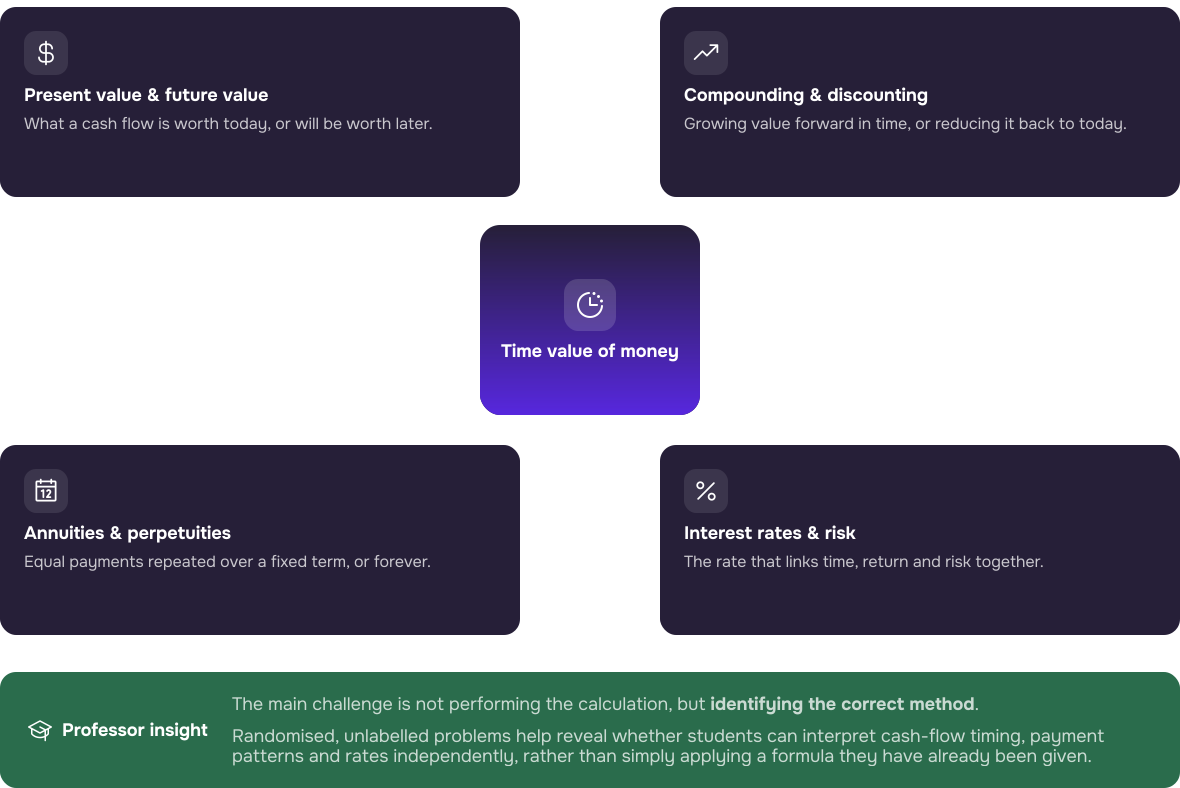


The simulation is most effective after teaching present value, future value, discounting, compounding and annuities to test whether students can select the appropriate method independently.
Player answers and worked solutions help identify problems with method selection, rates, periods, formula construction, decimals and numerical entry.
Submitted answers, scores and attempted-question data can support targeted feedback, classroom debriefing and optional individual assessment.
The Professor Admin Panel brings participant management, stage controls and delivery guidance together. The Student Interface guides each participant from concept preparation into timed numerical problem-solving and final performance review.
Review the stages, adjust the available time and manage cohort-wide progression from one timeline.
Open Setup & Facilitation guidance and the Teaching Notes directly from the Admin Panel.
Play starts automatic progression. Pause holds the timer in the current stage. Stop locks student screens.
Students can revisit explanations and examples covering the principal TVM methods before the timed challenge.
Students interpret each problem, complete the calculation and enter a numerical result rather than choose from predefined options.
Students can see how their accumulated score compares with the rest of the cohort during the competition.
All participants receive the same core preparation resources. Qualitative concept explanations sit alongside quantitative formula and Excel examples before students apply the methods independently.
Review the principles, formulae and examples that underpin the timed questions.
Compare the underlying formula with an equivalent Excel calculation before entering the Timed Game. The workbook supports preparation and is not a scored submission.

4 mins
The four-minute opening video introduces the simulation purpose, the individual mission, the four-stage journey and practical tips for success before students begin Preparation.
Assessment is optional. Professors may run the simulation as an ungraded applied activity, use it to reinforce classroom teaching or incorporate its outputs into a wider assessment. Platform data can support academic judgement, but simulation scores should not automatically replace it.
The simulation can progress automatically after Play is selected, and coaching is optional. Pause is useful for a short teaching intervention, Stop locks student screens without resetting submitted work, and Play resumes the activity. Multi-session delivery can separate Preparation from the Timed Game.
Step 1
Use Player Management to organise individual access and review the student experience before delivery.
Step 2
Review the Intro, Preparation, Timed Game and Reflection stages and adjust the displayed timings.
Step 3
Select Play to start or resume. Use Pause for a temporary intervention and Stop when student screens need to be locked.
Step 4
Use Results and Player Answers to examine submitted answers and worked formula and Excel solutions.
Everything needed to prepare, run and debrief the Time Value of Money Simulation is organised within the resources below.
Option 1:
Run the simulation in a single session. You can pause the simulation to provide coaching if you want.
Option 2:
Split the simulation over 2 lectures. Stop the simulation at the end of a lecture and resume it at the beginning of the next.
These industry professionals were involved in the inception, creation, development, testing and optimisation of the simulation.

Investment banking experience across UBS, Morgan Stanley, and Deutsche Bank. Studied Mathematics at Saratov University.

Former Practice Specialist in McKinsey’s Corporate Finance team in Germany and Finance professor at Aberdeen University.

Worked in the finance department of Precomp Tools. Studied Engineering and holds an MSc in Corporate Finance from Bayes.

Assistant Professor of Finance at Tilburg University, teaching corporate finance courses. Also lectures at TIAS Business School.

Senior investment banker at Morgan Stanley with experience in M&A and TMT coverage across New York and San Francisco. Studied business at Kellogg.
During the call, we can: