Analyse competing projects
Calculate NPV, IRR, profitability index and payback from each project's cash flows and discount rate.

Capital Budgeting Simulation
Students apply NPV, IRR, profitability index and payback to appraise competing projects, then allocate a fixed budget across a portfolio.
The Capital Budgeting Simulation is a one to two hour, single-player business simulation in which each student takes the role of a CFO and decides which investment projects a company should fund. Students appraise competing projects using Net Present Value, Internal Rate of Return, Profitability Index and Payback Period, then allocate a fixed $10 million budget across a portfolio.
Calculate NPV, IRR, profitability index and payback from each project's cash flows and discount rate.
Choose a portfolio while remaining within a fixed investment budget.
Submit reasons, review the optimal outcome and compare the value generated.
Duration
Run the complete teaching experience in one session or divide it across shorter sessions.
Format
Each student makes decisions independently from the perspective of a CFO.
Level
Suitable for introductory, business, corporate, managerial and financial management courses.
Professor tools
Manage students, adjust stage timings, control progression and monitor student inputs.
Prerequisites
Suitable for beginners, with video guidance, case information, task checklists, pop-ups and tooltips.
Delivery
The web-based simulation supports in-person, remote, blended and homework-supported delivery.
Assessment
Platform data can support professor review of calculations, decisions, portfolio value and comparative results.
Course Fit
Designed for Intro to Finance, Business Finance, Corporate Finance, Financial Management, Managerial Finance, and Business and Management courses.
Students evaluate investment opportunities using NPV, IRR, payback period and profitability index, learning how to combine financial calculations with risk judgement and capital constraints to select the strongest project portfolio.
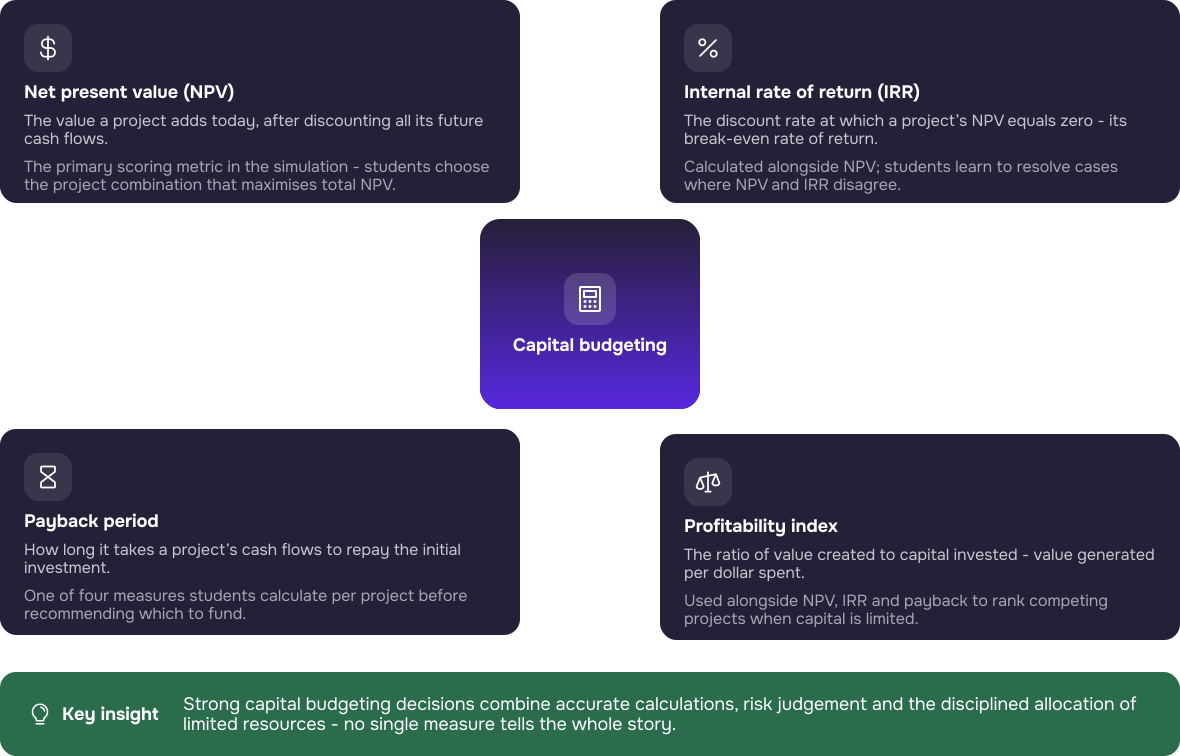


Students calculate NPV, IRR, PI and payback, then interpret them together to justify one recommendation, including where NPV and IRR disagree."
The portfolio stage shows why a collection of individually attractive projects may not create the strongest portfolio. Students must consider combinations, available capital and total value creation.
Once the session is set up, the simulation guides students through every stage from start to finish. Professors can monitor progress and step in when needed, without having to manage each activity or provide constant instruction.
The Professor Admin Panel brings the timeline, session controls, student management and teaching guidance into one place. The Student Interface leads students from project appraisal to capital rationing and final performance review.
The timeline shows the complete stage sequence and allocated timings. Professors can select a stage to move all students to that point or use Adjust to change the time available.
The Admin Guide provides Setup & Facilitation guidance, Teaching Notes and the Gameflow Diagram. The First Time User Guide is a useful tool for first time users.
Play starts automatic progression. Pause holds the timer in the current stage. Stop locks student screens.
Students review their CFO role, understand the objectives they are working towards and clarify the key decisions they will need to make during the simulation.
Students compare project-level measures, track invested and remaining capital, select a combination within the budget and provide reasons for the allocation.
The final screen presents the value generated, comparative class position and access to the optimal portfolio and project results.
Every student receives the same project information. The materials combine business context, projected cash flows, discount rates and project-specific qualitative risks so students must interpret the case before committing capital.
Students open each project case to understand the investment, its commercial purpose and the risks behind the financial projections before completing the appraisal.
Discount rates, investment requirements, cash-flow projections and appraisal measures support both the single-project decision and the later portfolio rationing.

5 mins
A short introduction that prepares students for the CFO role, explains the simulation stages and outlines how project appraisal measures will inform their investment and capital rationing decisions.
Assessment is optional. Professors may run the simulation as an ungraded applied activity focused on practice, comparison and discussion. Where assessment is appropriate, platform data can support academic judgement by showing calculations, decisions, portfolio values and comparative results. Simulation scores should support, not automatically replace, the professor’s academic judgement.
The simulation can progress automatically after Play is selected or be advanced manually through the timeline. Coaching is optional, allowing professors to intervene only when clarification or reflection would add value.
Step 1
Use Player Management to add the students taking part. Every student completes the simulation individually from the same CFO perspective, so no team formation or role allocation is required.
Step 2
Review the five-stage timeline and use Adjust to increase or reduce the time assigned to individual stages.
Step 3
Select Play to begin the timer and support automatic progression. Pause is useful for a break or class-wide clarification. Stop freezes student activity and locks screens.
Step 4
Use Live Monitoring to review inputs and decision tables. Coach selectively without directing students towards the preferred answer. Use the final leaderboard, portfolio values and optimal portfolio to structure the debrief.
Everything needed to prepare, run and debrief the Capital Budgeting Simulation is organised within the resources below.
The simulation can sit inside an existing course as a single workshop, a staged activity or a homework-supported exercise.
These industry professionals were involved in the inception, creation, development, testing and optimisation of the simulation.

Investment banking experience across UBS, Morgan Stanley, and Deutsche Bank. Studied Mathematics at Saratov University.

Former Practice Specialist in McKinsey’s Corporate Finance team in Germany and Finance professor at Aberdeen University.

Worked in the finance department of Precomp Tools. Studied Engineering and holds an MSc in Corporate Finance from Bayes.

Assistant Professor of Finance at Tilburg University, teaching corporate finance courses. Also lectures at TIAS Business School.

Senior investment banker at Morgan Stanley with experience in M&A and TMT coverage across New York and San Francisco. Studied business at Kellogg.
During the call, we can: