The measures, applied
Calculate and interpret DSO, DIO, DPO, turnover ratios and the Cash Conversion Cycle against alternative receivables, inventory and payables policies.

Working Capital Management Simulation
Students apply DSO, DIO, DPO and the Cash Conversion Cycle to manage receivables, inventory and payables across a 12-month business scenario.
Students calculate DSO, DIO, DPO and the Cash Conversion Cycle, then run the policies those measures imply for twelve months. Receivables, inventory and payables choices accumulate, and the year-end position determines whether the company can fund expansion at all.
Calculate and interpret DSO, DIO, DPO, turnover ratios and the Cash Conversion Cycle against alternative receivables, inventory and payables policies.
Twelve monthly decisions on credit terms, collections, stock and supplier terms compound into the year-end liquidity position.
Students recommend Expand, Expand with Caution or Delay, and discover that growth can worsen cash even as margins hold.
Duration
Run the complete activity in one session or divide it across teaching blocks.
Format
Each participant independently manages Northwood Furnishings.
Level
Suitable for students developing applied working-capital and financial-management judgement.
Professor tools
Manage participants, control the timeline, send alerts and review student activity and inputs.
Prerequisites
The simulation is suitable for beginners and includes guidance throughout the activity.
Delivery
The web-based simulation can be delivered through LMS/LTI or the Finsimco website.
Assessment
Use calculations, decisions, rationales and results as supporting evidence or run the activity ungraded.
Course fit
Fits working capital, cash flow, treasury and financial statement analysis teaching.
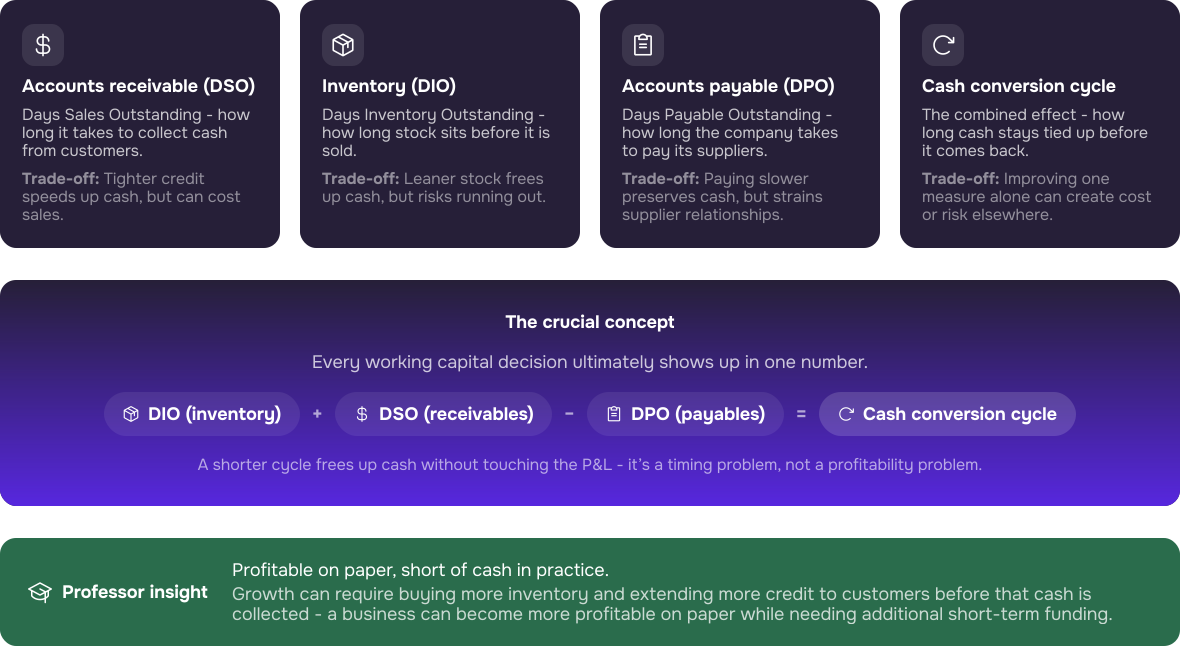
Accounts receivable, inventory and accounts payable determine how long cash remains tied up in the business. Managing DSO, DIO and DPO together helps improve liquidity while protecting sales, supplier relationships and day-to-day operations.

It gives students a structured way to apply the operating-cycle measures, compare working capital policies and explain the resulting financial position.
Students calculate DSO, DIO, DPO and the Cash Conversion Cycle, then explain what the combined result means for liquidity and cash flow.
Students compare customer credit, inventory and supplier-term choices rather than optimising one measure in isolation.
Individual calculations, rationales, scores and ending metrics make it easier to compare decision paths across the cohort.
The Professor Admin Panel supports setup, timing, participant oversight and delivery. The Student Interface guides each participant from calculation and strategy selection to monthly decisions and final reflection.
The Timeline displays the complete simulation sequence and its stage durations. Professors can adjust timings, start automatic progression or move every participant manually to a selected stage.
The Admin Guide provides access to Setup & Facilitation, Teaching Notes and the Gameflow Diagram. Player Management allows professors to manage participants and open an individual student view when access needs to be checked.
Play starts automatic progression. Pause holds the timer in the current stage. Stop locks student screens.
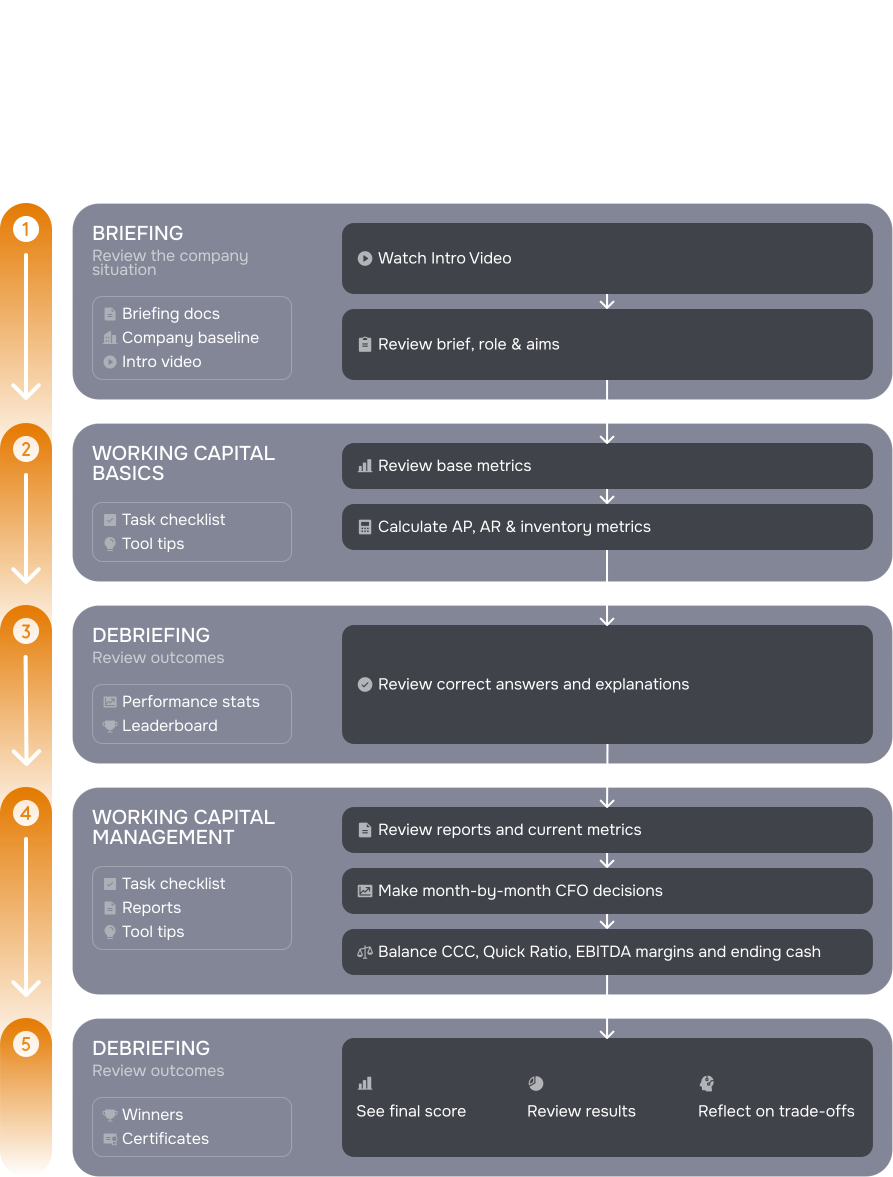
Students review their role as CFO of Northwood Furnishings, understand the working capital and expansion objectives, and identify the key decisions they will make across receivables, inventory, payables and cash flow.
Students review Northwood’s baseline data, complete the required calculations and compare alternative strategies before submitting their choices.
The final Summary places initial and current metrics alongside profit-and-loss and balance-sheet outputs, allowing students to review the financial profile created by their decisions.
Every participant receives the same case information because the simulation uses one individual CFO role. Students combine qualitative evidence about Northwood’s operating model with quantitative evidence about expansion funding, cash and readiness.
Students receive a company overview covering Northwood’s business model, operations, market position and key commercial strengths.
Students receive financial information on Northwood’s current performance, funding requirements, cash targets and the conditions that will determine whether expansion is financially viable.

5 mins
A short video introducing the Northwood Furnishings case, the CFO role and the simulation’s key stages.
Assessment is optional. Professors may run the simulation as an ungraded applied activity or use platform data as supporting assessment evidence. The score, calculations, decisions, rationales and resulting financial profile can inform academic judgement, but the simulation score should not automatically replace it.
The simulation can progress automatically, but the professor retains control of participants, stage timings and session progression. Coaching is optional.
Step 1
Set up participants through Player Management and confirm that each student can enter through LMS/LTI or the Finsimco website. Every student completes the simulation independently as CFO of Northwood Furnishings.
Step 2
Review or adjust the standard timings: a 7-minute Intro, 40-minute WC Basics stage, 5-minute Reflection, 60-minute WC Management stage and a final Reflection with no time limit.
Step 3
Press Play to begin automatic progression. Pause holds the timer. Stop holds the timer and locks student screens. Press Play again to resume after either action. Submitted data is not reset.
Step 4
Use Live Monitoring to review student activity and inputs. Intervene where students need clarification about the task, calculations or interface, without directing them towards a preferred strategy.
Everything needed to prepare, run and debrief the Working Capital Management simulation is organised within the resources below.
The Working Capital Management simulation is designed to be integrated into existing courses, either as in-classroom or as homework.
Option 1:
3 hours in one session. The Working Capital Management simulation can be paused to allow short breaks. The facilitator may provide coaching during the simulation (optional).
Option 2:
Break up the simulation into smaller sessions:
• 4 x 45 min
• 3 x 1 hour
• 2 x 1.5 hours
The simulation for Working Capital Management can be paused at the end of each session and resumed at the next one. The facilitator may provide coaching during the simulation (optional).
Option 3:
Participants can complete the simulation as homework, with a set timeframe such as one day or one week determined by the facilitator.
Option 4:
Hybrid approach, beginning the simulation in a class setting and allowing participants to finish it independently.
These industry professionals were involved in the inception, creation, development, testing and optimisation of the simulation.

Investment banking, capital markets, PE, and corporate ratings experience at Morgan Stanley, S&P, and HPS Investment Partners. Holds a PhD in Quantitative Finance.

Corporate finance experience across M&A, structured finance, credit risk, and leveraged finance at Morgan Stanley, SMBC, and Citi. Holds a BSc in Economics.

Structured finance, credit, credit derivatives, and NPL expertise. Portfolio Director at a private equity impact fund and active VC investor. Holds CFA and FRM qualifications.

Worked in the finance department of Precomp Tools. Studied Engineering and holds an MSc in Corporate Finance from Bayes.
During the call, we can: